


ArtPro - Art Auction Results
4.51.00 Reviews
App Specs
- Version
- 3.134.56
- Updated On
- License
- Free
- Downloads
- 10,000+
- Developer
- ArtPro HK Limited
- Categories
- Art & Design
- Platform
- Android
Screenshots
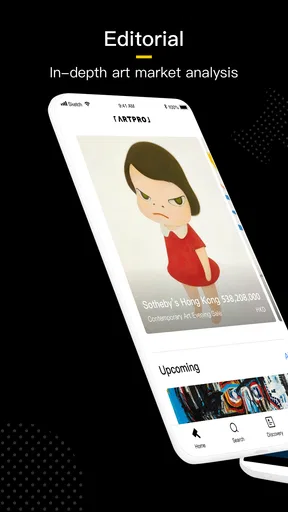

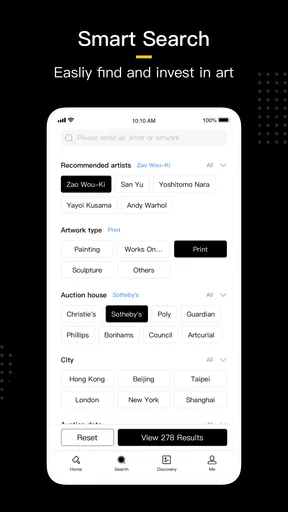
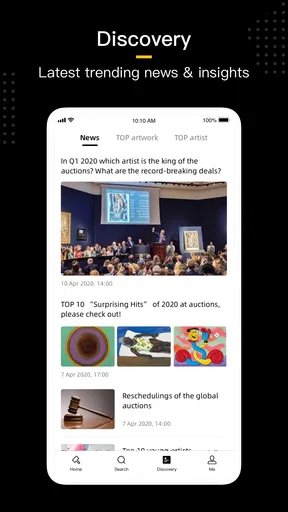
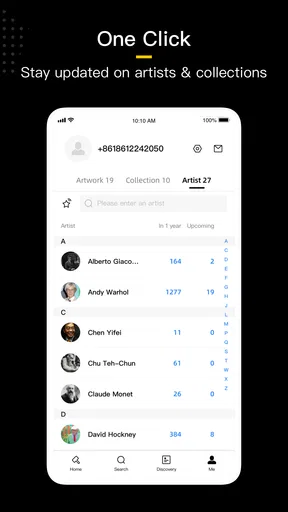
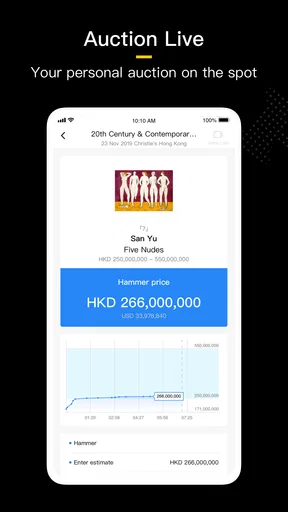
 Analysis by AppCompare
When I first opened ArtPro - Art Auction Results, I expected a simple art-price lookup tool. That is broadly what it is, but its usefulness depends on how you search and how carefully you interpret what appears. Developed by ArtPro HK Limited, this free Art & Design app is aimed at people who want auction results close at hand rather than scattered across auction-house pages, general web searches, and saved screenshots.
I found it most interesting as a research companion. It is not an art-making app, a gallery-management system, or a replacement for specialist valuation advice. Its role is narrower and more practical: helping you investigate the market history around an artwork, artist, or sale. That makes it potentially valuable for collectors, students, dealers, interior designers, and curious buyers who want more context before making a decision.
The app has an average rating of 4.5 from 36 ratings, with over 10K installs, so it has a modest but positive audience rather than the reach of a mainstream creative platform. It is free to install, although in-app purchases range from $2.99 to $399.99 per item. That pricing detail matters because casual users should approach the app as a way to explore first, then decide whether deeper access is worth paying for.
How I would use ArtPro for a normal art-price search
I would treat this section as a simple search routine: start with the artist or a distinctive title, then use the details of the work to judge whether each result is genuinely comparable. I also find it helpful to decide in advance whether I’m checking market history, weighing an asking price, or learning how a particular artist’s work is described at auction; that keeps a quick lookup from turning into a misleading price verdict.
Start with a focused question
The best first step is not typing the broadest possible term. If I am researching an artist, I begin with the exact name and then narrow my attention by the work, period, medium, or sale context when the app makes those distinctions available. A broad search can be useful for orientation, but it can also mix similarly named artists, different kinds of works, or results that are too distant from the piece I am considering.
That is the first habit I would recommend: decide what you are trying to learn before searching. Are you checking whether an artist has an auction history? Are you comparing prices for similar works? Are you trying to understand whether a seller’s number sounds realistic? Each question calls for a different reading of the results. A single high result should not become your automatic benchmark, and a low result should not immediately be treated as a bargain.
In everyday use, I would keep the original artwork details beside me while searching. The artist’s full name, title, medium, dimensions, and approximate date can change the relevance of a comparison. If I only search an artist’s name, I may find a useful overview but not a close match. If I search too narrowly, I may miss comparable works because auction catalogues describe them differently.
Worth Reading Before You Choose

EA SPORTS FC Mobile 26 Is a Bigger Football Game, but It Takes Time

Flipboard Shows What News Apps Must Do Beyond the Feed

Switching to Android Auto Means Rethinking Your Driving Routine

Google Calendar Makes a Crowded Week Easier to Manage

Ludo King Makes the Most of the Minutes Between Plans

Baby Panda World Brings Quick Play to Modern Phones, but Its Game Library Feels Busy
Read results as evidence, not as a guaranteed valuation
Art auction results are historical reference points. They can help me see how a work was presented and what happened in a particular sale, but they do not automatically tell me what the same work is worth today. Condition, provenance, authenticity, exhibition history, size, medium, framing, location, buyer demand, and the auction house itself can all affect the outcome.
This is where I think the app is most useful for beginners: it encourages a more grounded conversation than looking at an asking price alone. A private seller can choose any asking figure, while an auction result shows an actual transaction context. Even so, I would avoid treating one record as proof. I prefer to collect several reasonably comparable results and look for a pattern.
A practical routine is to separate three questions in your notes. First, what kind of work is being compared? Second, how close is it to the artwork in front of you? Third, are the figures being displayed in a way that makes them directly comparable? Keeping those questions separate prevents the common mistake of comparing a small drawing with a major painting simply because both were made by the same artist.
A realistic scenario for collectors and buyers
Imagine I am considering a work at a local gallery and the seller mentions that the artist has performed strongly at auction. I would use ArtPro to search the artist, inspect several relevant results, and note whether the examples share the same medium and period. I would then compare the gallery’s asking price with the broader pattern rather than with the single most impressive result.
If the app shows a thin history or results that are difficult to match, that is still useful information. It tells me to slow down and ask more questions instead of forcing a conclusion. I might request condition details, provenance documents, or an independent opinion. The app cannot replace that due diligence, but it can help me arrive at the conversation better prepared.
Settings, shortcuts, and repeatable research habits
Here I focus on making research easier to repeat, not on assuming the app has shortcuts that may not be available. I’d keep a short list of alternate artist spellings and catalogue terms, and note why each result belongs in a comparison. That small habit is especially useful when I return to a search later or need to explain my reasoning to a buyer, colleague, or client.
Check the basics before doing serious research
Because this is a research app rather than a drawing canvas, the important settings are the ones that affect how comfortably I can search, read, and revisit information. I would first check the app version shown on my device and make sure the interface behaves properly on the phone or tablet I plan to use. The current version is 3.134.56 and it supports Android 5.0 or later, which makes it accessible to many older Android devices.
I would also pay attention to how search terms are entered. Names with accents, initials, alternate spellings, and translated titles may produce different results. This is not a reason to distrust the app; it is a reason to search deliberately. For an artist with a common name, adding a full name or a distinctive work title can reduce noise. For an artist whose name is often written in more than one way, trying those variations can reveal records that a single query misses.
The Teen content rating is another small but relevant detail for families and younger students. I would not treat that label as a description of the app’s research quality. It simply means parents and educators should consider whether the content and the surrounding use case are appropriate for the particular user.
Build a comparison note outside the search screen
One of my strongest recommendations is to keep a small, consistent research note while using the app. Record the artist, work title, medium, approximate size, sale context, and the reason you considered the result comparable. This habit is more valuable than repeatedly opening the same search without a method.
For example, I might mark a result as “close medium, different scale” or “same period, weaker condition information.” Those short comments protect me from forgetting why a result looked relevant. They also make the research more useful when I return to it days later. The app provides the search environment, but the quality of the final judgment comes from how I organize what I find.
I would also avoid saving only the most attractive numbers. A balanced note should include ordinary results and outliers, because the spread often tells me more than the peak. If the app offers ways to revisit searches or records, I would use them as a starting point for a repeatable workflow rather than assuming that every result is equally important.
Use a two-pass search instead of trying to be precise immediately
A fast and reliable pattern is to search twice. In the first pass, I use a broad artist or subject query to understand the available landscape. In the second, I narrow the search using the details that proved useful in the first pass. This is usually better than guessing a perfect search phrase at the beginning.
The two-pass method is particularly helpful when catalogue language differs from everyday language. I may call something a portrait, while an auction record uses a title or medium description that I would not have chosen. The broad search helps me discover that vocabulary. I can then reuse it to find closer comparisons.
Experienced users can make this process quicker by keeping a small list of alternate spellings and descriptive terms for artists they research often. That is a simple shortcut, but it prevents repeated trial and error. It also makes the app feel less like a collection of isolated searches and more like a research tool with a personal method behind it.
Know when paid access changes the decision
The free installation lowers the barrier to trying the app, but the in-app purchase range means I would not commit to a paid option without a clear purpose. A casual user who wants to check one artist may have a very different need from a dealer who researches works regularly. Before paying, I would first test whether the search results are relevant to my field and whether the available information supports the decisions I actually need to make.
This is also where I would resist the temptation to pay simply because a result feels important. If I am considering a costly purchase, the better approach is to use ArtPro as one part of a broader process that may include the seller’s documents, condition information, specialist advice, and direct confirmation from the relevant professional sources. Paying for more access does not turn historical auction data into a formal appraisal.
Where it is faster than ordinary alternatives
Compared with a general web search, a dedicated auction-results app can reduce the amount of irrelevant material I have to sort through. A web search often mixes auction records with gallery listings, social posts, advertisements, and articles. ArtPro’s focused purpose gives me a more direct route to the market-history question.
Compared with checking individual auction-house websites one by one, the app is more convenient for initial exploration. I can begin with a single artist or topic and decide which results deserve deeper investigation. That is especially useful when I am still learning the market and do not yet know which auction houses or catalogues are most relevant.
However, I would still return to original auction-house material when the decision becomes serious. A focused app is excellent for discovery and comparison, while primary documentation is better for verifying the details of a particular lot. The smartest workflow uses both rather than treating them as competing choices.
Advanced limits and the point where judgment takes over
This section is about recognizing where search results stop being enough. I’d use auction records to frame better questions, then check original sale documentation and seek qualified advice when condition, provenance, authenticity, or a significant purchase is at stake. The key distinction is that a useful price reference can inform judgment, but it cannot replace it.
Historical prices can be misleading without context
The biggest limitation is not necessarily the act of searching; it is the temptation to overinterpret clean-looking results. Art markets are uneven. A famous work, a rare subject, an exceptional provenance, or an unusually strong sale can distort a quick impression of an artist’s typical performance.
I would be particularly careful with emerging artists or artists whose records are sparse. A small group of results may not represent a stable market. It may reflect a handful of works with very different qualities. In that situation, ArtPro can show what has happened, but it cannot manufacture a reliable trend from limited evidence.
The same caution applies to currency and sale terminology. Before comparing figures, I would check how the result is described and whether the number represents the hammer price, a total including fees, or another presentation. If two records use different conventions, placing them in one simple ranking can lead to a false conclusion.
Search precision has a trade-off
Broad searches maximize discovery but create more sorting work. Narrow searches save time but risk excluding relevant records because the catalogue uses different wording. I see this as an important trade-off rather than a flaw unique to the app.
My solution is to begin broad, identify the language used in relevant records, and then narrow gradually. I would not keep adding filters or terms just to produce a smaller list. A short list is not automatically a better list if it has removed the closest comparisons. The goal is relevance, not minimal screen clutter.
This approach is also useful when researching an artist with works across several media. I would separate paintings, prints, drawings, sculpture, or other categories whenever the available information allows it. Combining them may make the artist look more active, but it can make the price comparison meaningless.
Who should use it and who should skip it
I think the app suits collectors who want a quick first layer of research, students studying the relationship between artists and markets, and design professionals who need background before discussing artwork with a client. It can also help a curious buyer learn the vocabulary of auction records and become less dependent on a seller’s headline claim.
I would be more cautious recommending it to someone who wants an instant “true value” for a single artwork. That expectation is too narrow for auction history, regardless of the quality of the search tool. A professional appraiser, specialist dealer, or auction-house expert may be the better next step when authenticity, condition, provenance, or a major financial decision is involved.
It is also not the right choice for someone looking for digital painting tools, photo editing, mood boards, or a portfolio workspace. Its Art & Design classification describes the subject area, but the practical function is market research. If your goal is to create images rather than investigate auction outcomes, another kind of app will serve you better.
Privacy, cost, and practical expectations
Since the app is free to install but includes paid items, I would review each purchase carefully before confirming it. The listed range runs from $2.99 to $399.99 per item, a wide gap that makes it especially important to understand what level of access you are selecting. A person doing occasional research should not assume that a professional-oriented purchase is necessary.
I would also avoid entering sensitive client or transaction information into any search field. There is no reason to include private details when an artist name, work title, or general descriptive term is enough. Keeping the app focused on public-facing research makes the workflow cleaner and reduces avoidable exposure of personal information.
My verdict after using it as a research companion
ArtPro - Art Auction Results works best when I treat it as a structured starting point rather than a final authority. Its strength is the directness of the task: search for art-market history, compare relevant records, and use what you learn to ask better questions. The free entry point makes it easy to test, while the positive 4.5 average suggests that its basic purpose is landing well with the users who have rated it.
The app becomes much more useful when paired with disciplined habits. I would search broadly first, refine with catalogue language, separate genuinely comparable works from loose matches, and keep notes explaining why each result matters. Those steps take a little effort, but they turn a quick lookup into research that I can actually defend later.
My main reservation is the risk of false confidence. Auction results look precise, yet art valuation is full of context that a number alone cannot capture. I would never use one eye-catching record to justify a purchase, and I would not confuse paid access with professional appraisal. For important decisions, I would combine the app with primary sale documentation and qualified human advice.
For a collector checking an artist before a gallery visit, a student learning how auction markets are documented, or a designer preparing for a client conversation, I would recommend giving it a careful trial. For creative production, formal valuation, or exhaustive specialist due diligence, I would choose a different tool or add expert support. Used within those boundaries, this app is a convenient way to bring auction-result research into an everyday mobile workflow.
ArtPro was released on Nov 12, 2019, and its current version shows that it remains maintained as a working mobile product. I would install it when I need focused art-price research, then judge its value by the quality of the comparisons I can make—not by how quickly it produces a number. That mindset is the difference between using it as a shortcut and using it intelligently.
Pros
- Covers auction results from many international art markets.
- Useful for comparing past sale prices before buying or selling.
- Search tools help locate artists
- artworks
- and auction records quickly.
- Can support research into market trends and artist performance.
- Convenient reference for collectors
- dealers
- and art professionals.
Cons
- Detailed auction data may require a paid subscription or in-app purchase.
- Coverage and accuracy can vary between artists
- regions
- and auction houses.
- Results may not include private sales or the latest auction updates.
- Specialized terminology may be difficult for casual art enthusiasts.
- App usefulness depends heavily on having a stable internet connection.
FAQs for ArtPro - Art Auction Results
What is ArtPro - Art Auction Results used for?
ArtPro - Art Auction Results is designed for people who want to research the auction history and market performance of artworks. After exploring the app, users can use it to look up artists, review past sale prices, compare auction results, and follow trends across different periods. It can be useful for collectors, dealers, students, and anyone researching the value or popularity of particular artists.
Does ArtPro provide accurate and reliable auction prices?
The app presents auction-result information collected from available art-market records, but users should still treat the figures as research data rather than guaranteed valuations. Final prices can vary depending on the auction house, currency, buyer’s premium, artwork condition, provenance, size, and sale date. For important purchases or valuations, it is wise to confirm details with the original auction house or a qualified specialist.
Can I search for a specific artist or artwork in ArtPro?
Yes, the main purpose of ArtPro is to help users investigate artists and their auction records. You can search for relevant names and browse available results, including sale information and historical price data when it has been indexed by the service. Search coverage may differ between artists, regions, and auction periods, so a missing result does not necessarily mean that an artwork has never been sold.
Is ArtPro suitable for beginners who are new to art collecting?
ArtPro can be helpful for beginners because it offers a practical way to become familiar with auction prices, artist demand, and historical sales. However, the app does not replace basic education about authentication, condition reports, provenance, attribution, or auction terms. New collectors should use the information as a starting point, compare several sources, and avoid making expensive decisions based only on one displayed result.
Does ArtPro - Art Auction Results require a subscription or internet connection?
Because auction information is generally retrieved from an online database, an active internet connection is normally important for searching and loading updated results. Access to some features or the full database may depend on the app’s current pricing model, account requirements, or subscription options, which can change over time. Before downloading, check the official store listing for the latest details about payments and available features.


